
Find what is really on the network.
Define discovery jobs, run them across your address ranges, and see every device marked new, matched or changed against what you already hold.
- Network discovery
- IT discovery
- Multi-vendor
- Change detection
From address range to a reviewed device list.
Discovery jobs
Set IP targets with include and exclude ranges, a credential reference and a schedule. Estimate the target count, then run on demand.
Scan methods
Choose a network reachability scan, an SNMP inventory, or both. SNMP v2c and v3 are supported.
Device results
Each device is returned as new, matched, changed, conflict or failed, so review starts with what matters.
Scan detail
See the hardware tree, interfaces, IP addresses, prefixes, VLANs and VRFs for each run, plus the addresses that did not respond.
Change detection
Field changes between runs are recorded: hostname, IP, MAC, serial, vendor, model and part number. Devices no longer seen are flagged for review.
File-based discovery
Upload a spreadsheet of serials and tags. Rows are matched by serial number as matched, new or review, with a row-error report.
Network discovery, IT discovery and many vendors.
Run discovery for network equipment and for IT devices separately, each with its own jobs and results.
Network discovery
Find network equipment across your address ranges, with interfaces, addresses, VLANs and the hardware inside each device.
IT discovery
Find IT devices on the network and see each one as new, matched, changed or in conflict against what you hold.
File-based discovery
For equipment that cannot be scanned, upload a sheet of serial numbers and tags and match it the same way.
Multi-vendor by design
A device library holds profiles for each vendor, with a generic profile for everything else.
- Cisco
- Juniper
- Huawei
- Nokia
- Ericsson
- Fortinet
- Generic devices
What it looks like.
See every discovery run at a glance.
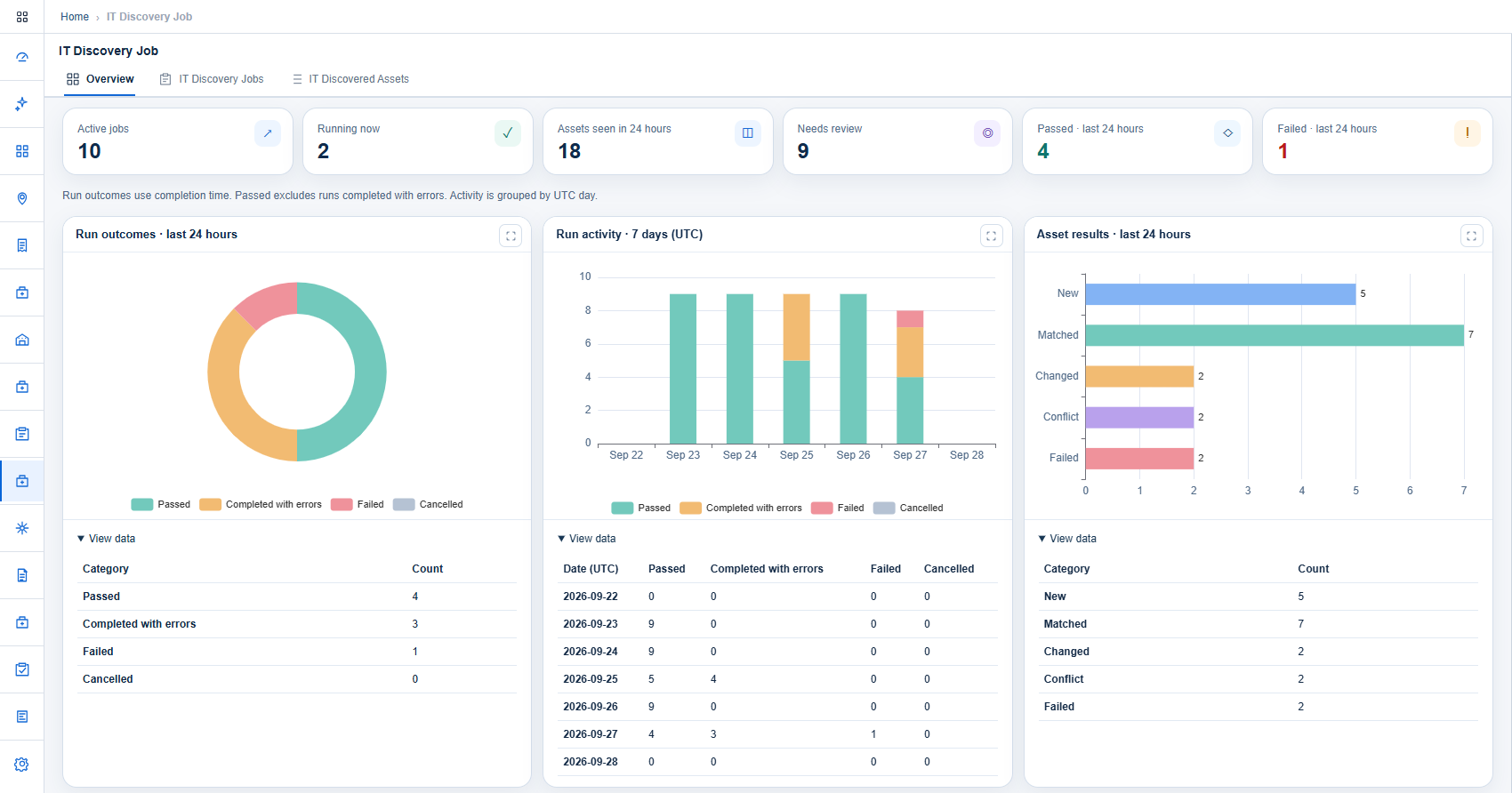
The overview shows active and running jobs, the assets seen in the last 24 hours and how many need review. Charts split runs into passed, completed with errors, failed and cancelled.
- Run outcomes for the last 24 hours
- Seven-day run activity
- Assets returned as new, matched, changed, conflict or failed
- The data behind every chart, one click away
Every run reports how it ended.
Runs are started manually or by schedule and keep their outcome and issues.
Queued
The run is accepted and waiting.
Running
Targets are being scanned.
Completed
All targets processed.
Completed with errors
Finished, with issues listed for follow-up.
Issues are classified as credential failure, unreachable device or missing serial number. Runs can also end as failed or cancelled.
Credentials are referenced, not stored in the job.
A job points to a credential reference. The scanner resolves the secret at run time from your vault.
- Credential references selected per job
- Secrets resolved by the scanner from a vault
- Serial numbers matched against the asset inventory
- Run history kept for every job
Connected modules.
Asset Management
The asset inventory: hierarchy views, sites on a map, a timeline per asset and approval-based lifecycle requests.
Fixed Asset Register
Booked entries detailed under maker-checker approval and reconciled against network, warehouse and contract records.
Asset Tagging
Tag requests with approval, configurable tag formats, and Code 128 or QR labels ready to print.
See Asset Discovery with your own data.
We will walk through this module on a workflow that matters to your organization.