
Capital work in progress, from first spend to capitalization.
Track each piece of capital work against its project: budget, committed, incurred and accrued amounts, completion dates and risk, through to capitalization approval.
- Project-linked
- Budget tracking
- Capitalization approval
- Dashboard
Keep capital work visible until it becomes an asset.
Project-linked records
Each record belongs to a project, and the project is checked against the Projects module.
Budget tracking
Hold budget, committed, incurred and accrued amounts. Remaining budget is calculated for you.
Capitalization approval
Capitalization needs an approver role, a capitalization date, a journal reference and a depreciable value.
Completeness checks
Asset number, ledger account and useful life must be filled before a record can be capitalized.
Dashboard
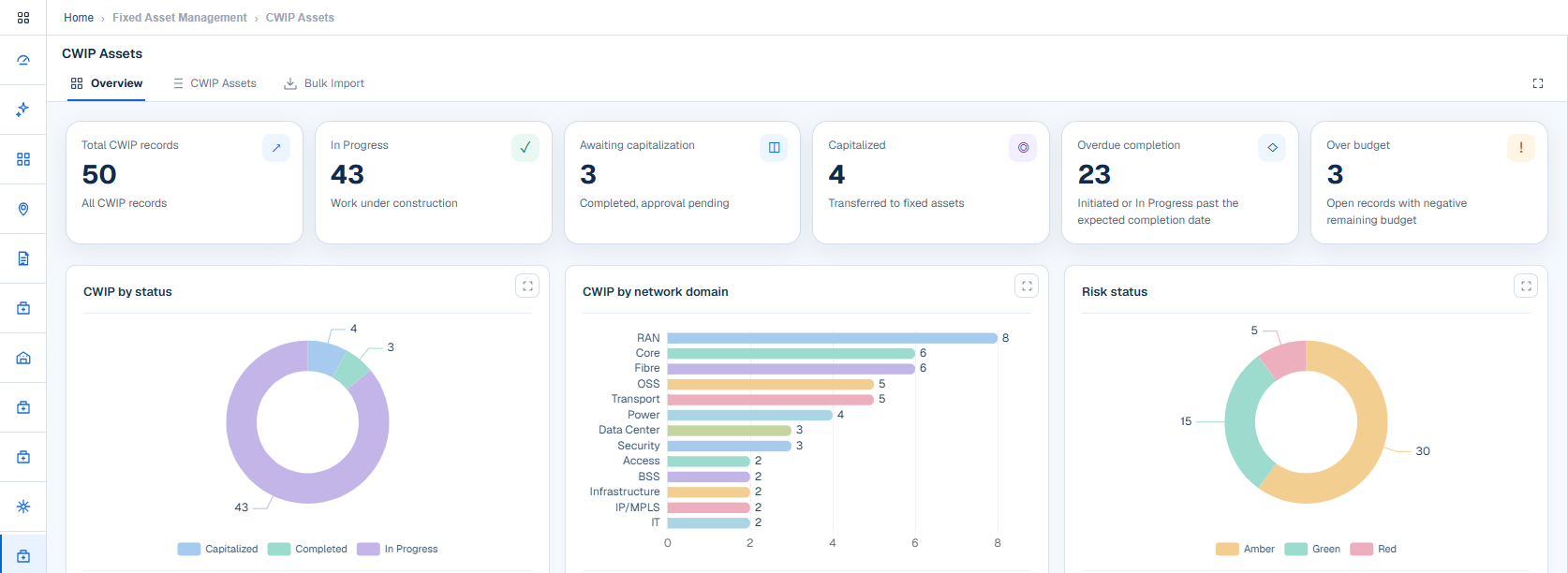
See totals, overdue and over-budget work, aging, the monthly trend and a list of items needing attention.
Import and history
Import in bulk using a template, and keep an audit trail showing each record before and after a change.
What it looks like.
Capital work in progress under watch.
Work in progress, awaiting capitalization and capitalized counts sit beside overdue and over-budget work. Charts split the portfolio by status, domain and risk.
- Overdue completion
- Over-budget records
- Risk status: green, amber and red
Four stages from start to capitalization.
Initiated
The work is registered.
In progress
Spend is being incurred.
Completed
Work is finished and under review.
Capitalized
Approved for capitalization.
Work with incurred or accrued spend cannot be cancelled, and a completed record can be sent back to in progress on review.
Organized by the way you run capital work.
Categories and filters keep large programmes manageable.
- Categories: construction, equipment, installation, commissioning, civil works, software and services
- Search, filter and sort
- Configurable grid columns
- Status history on every record
Connected modules.
See CWIP Assets with your own data.
We will walk through this module on a workflow that matters to your organization.