
One platform for the full asset lifecycle.
assetziq brings discovery, inventory, warehouse, procurement and the fixed asset register together on one record, with the same sign-on, approvals and history throughout.
- Operations
- Finance
- Procurement
- Warehouse
- Single sign-on
- Roles
- Approvals
- Audit history
- Network devices
- ERP and finance
- Files
- Identity provider
Everything an asset needs, in four parts.
Adopt one area and add the others when you are ready. They all work on the same record.
Discover
Find what is really on the network and compare it with the record.
Control
One trusted inventory with identity, hierarchy and financial standing.
Operate
Warehouses, stock, spares and case workflows in the same record.
Connect
Commercial context: procurement, contracts, invoices and licences.
Every asset stays traceable end to end.
Six governed stages, with what happens at each one, the evidence that is kept and the modules involved.
-
Register
The asset gets its identity.
An asset is recorded with its type, item code and serial number, and a tag is requested, approved and printed.
Evidence kept
- Tag request and who approved it
- The first entry on the asset timeline
- Where the record came from
Modules
-
Structure
It takes its place in the estate.
The asset is placed in the hierarchy and assigned to a site, so it can be found by element, site, technology or vendor.
Evidence kept
- Approved site codes
- Position in the hierarchy
- Current location status
Modules
-
Operate
It is stored, issued and moved.
Day to day, the asset moves between warehouses, sites and spare stores, and its status and location are kept current.
Evidence kept
- A stock ledger entry for each movement
- Location changes on the timeline
- Balances per bin, lot and serial
Modules
-
Reconcile
The record is checked against reality.
The inventory and the register are compared with discovery, warehouse and contract data. Differences are proposed and resolved.
Evidence kept
- Each run, with its date and rule version
- The outcome for every record
- Who proposed and who approved each resolution
Modules
-
Transform
It is transferred, replaced or sold.
When an asset changes hands or is swapped out, a request is raised and an approver decides before anything takes effect.
Evidence kept
- The request and its reason
- The approver and the decision
- Before and after on the timeline
Modules
-
Retire
Its history is closed, not erased.
The asset is dismantled and retired under approval. Its record stays, so the full story can still be shown years later.
Evidence kept
- Dismantle approval
- Retired status in the register
- The complete history, kept
Modules
Roles, approvals and event history govern each transition, creating a durable audit trail.
An overview for every module.
Each module opens on a screen that shows what needs attention, with the figures behind every chart.
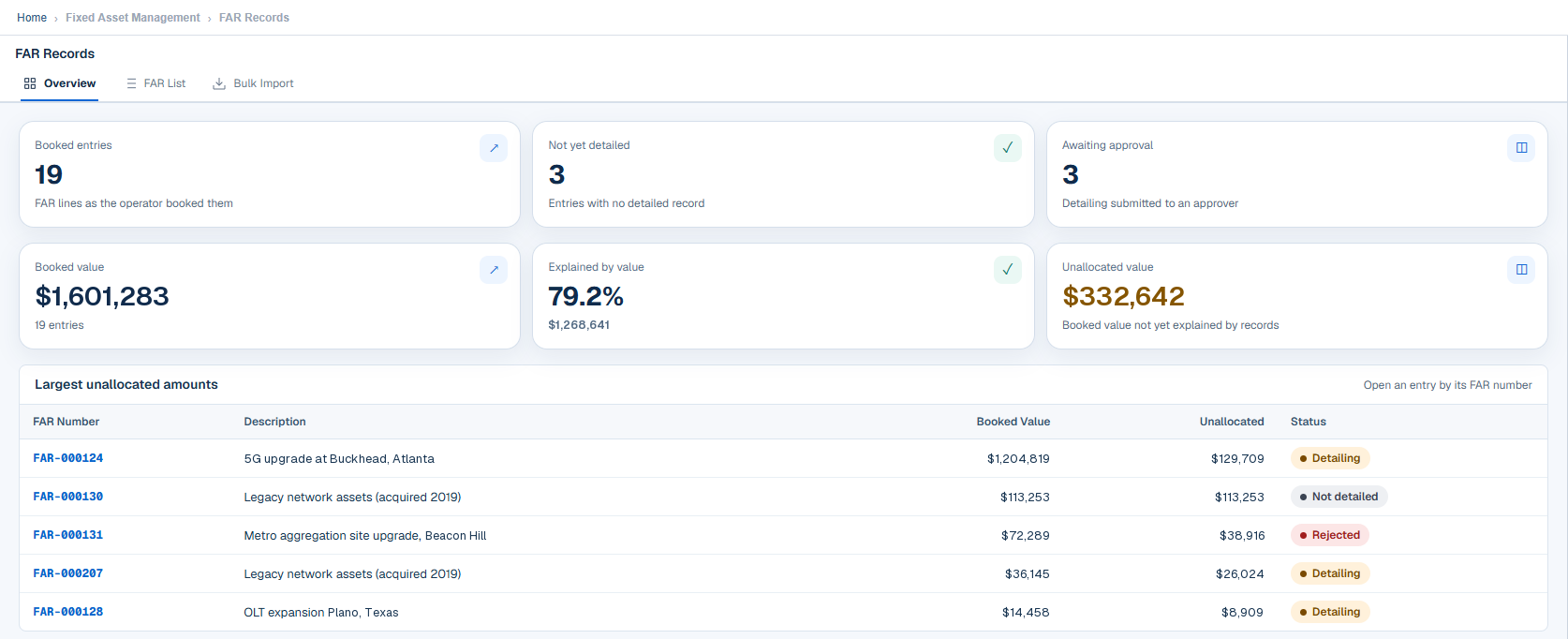
Take the full product tourKnow how much of the register is explained.
Booked value sits beside the share already explained by detailed records and the amount still unallocated. The largest unallocated entries are listed with their detailing status.
- Booked entries and those not yet detailed
- Detailing awaiting approval
- Explained-by-value percentage
- Largest unallocated amounts
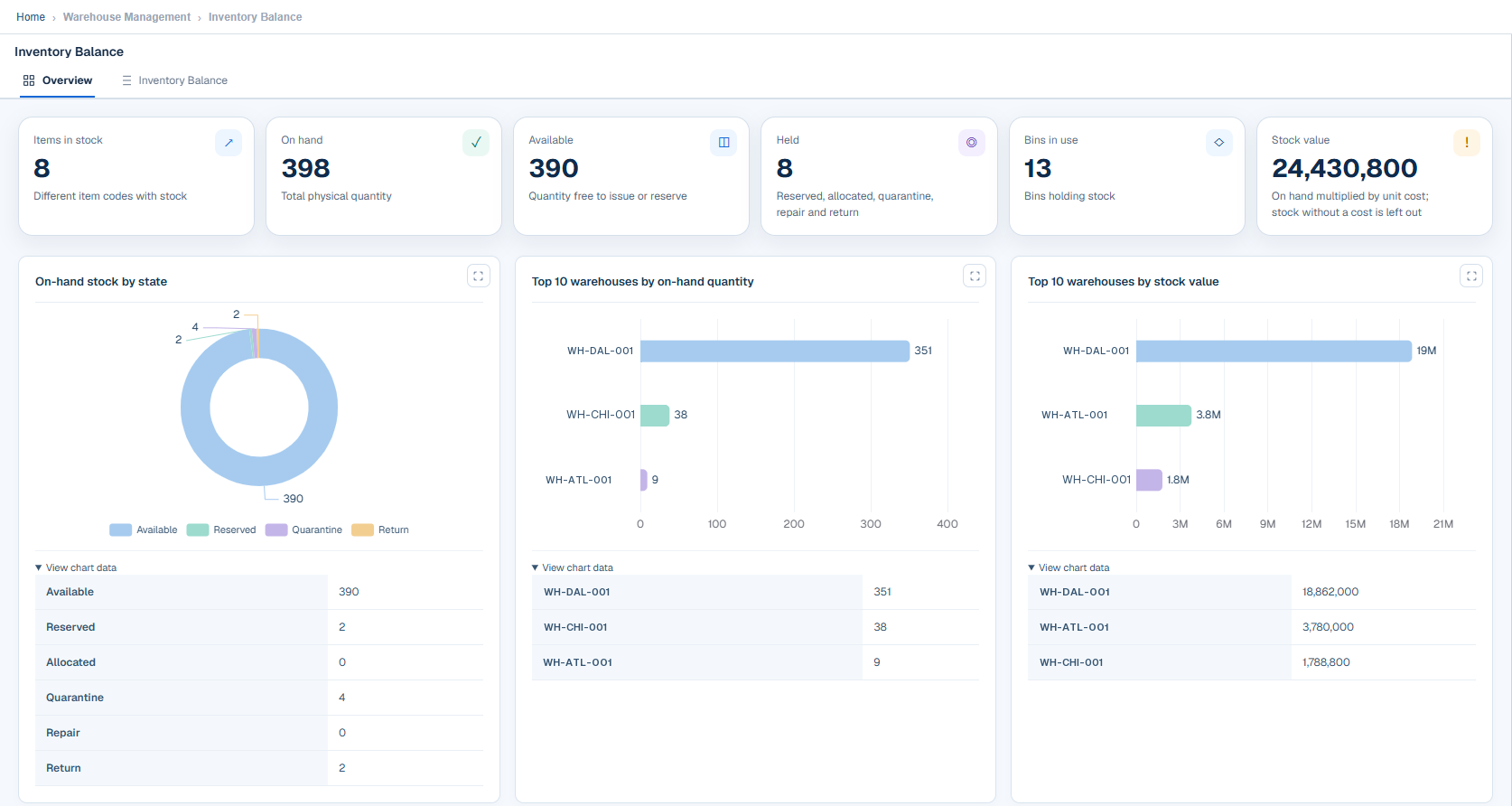
Stock position by state and warehouse.
Items in stock, on-hand, available and held quantities, bins in use and stock value, with on-hand stock by state and the top warehouses by quantity and by value.
- Available, reserved, quarantine and return quantities
- Top warehouses by on-hand quantity
- Top warehouses by stock value
Built once, used by every module.
These work the same way everywhere, so people learn them once and auditors review them once.
One sign-on
Sign in once, through your own identity provider, for every module.
Roles and permissions
Menus, screens and actions follow the role each person holds.
Approvals
Changes that matter are decided by an approver, with a reason recorded.
Audit history
Status and audit history are written together with each change.
One approval inbox
Approvers see what is waiting for them across modules.
Data import and sync
Load data in bulk with templates, and keep it in step through the APIs.
Multi-language
Each user works in the language they choose.
Any screen
The same portal on a desktop, a tablet or a phone.
One platform across every class of asset.
Different assets, one record and one set of controls.
Network and infrastructure
Devices found by network scan and SNMP, held with their site and hierarchy.
Hardware and equipment
Tagged, located and moved through transfer, replacement and sale under approval.
Stock and spares
Warehouses, bins and a stock ledger, with spare levels per site.
Fixed and capital assets
Capital work in progress, capitalization and a reconciled register.
Open to your systems, and getting smarter.
Integration ready
APIs across the product, file and batch exchange, direct device collection and single sign-on.
See integrationsAI and machine learning
Intelligence that understands your estate, anticipates problems and recommends the next step.
Explore AI and MLSecurity and compliance
Controlled access, approved change and the evidence an audit asks for.
Review securityPlatform questions, answered.
Is assetziq a single product or a custom build?
It is a single, repeatable product. Configuration and roles are set for each customer on a shared codebase that is improved continuously.
Can we adopt one area first?
Yes. You can begin with one workflow, such as discovery and the asset inventory, and add warehouse, procurement or finance modules as you expand.
Do all modules share the same data?
Yes. Modules read the same assets, sites, projects and contracts, so a change made in one is seen in the others.
How does assetziq integrate with our other systems?
Every area of the product has an API. Integration scope, such as ERP or identity systems, is agreed during onboarding.
Does the portal support more than one language?
Yes. The portal has multi-language support, and each user can choose their own language.
Can we use it on a phone?
Yes. The portal adapts to phone-sized screens in the browser.
See the platform working on a real workflow.
Tell us which part of the lifecycle matters most and we will walk through it end to end.